Connect Emailchef to n8n: open-source email marketing automation without limits

Connect Emailchef to hundreds of tools with n8n, the open-source Zapier alternative for marketing automation. No execution limits, your data always under your control, 100% GDPR-compliant.

Connect Emailchef to n8n: open-source email marketing automation without limits

Connect Emailchef to n8n and let your automations work for you.

With Emailchef and n8n you can build automated workflows that connect your email marketing to your CRM, spreadsheets, management tools, and hundreds of other apps.

The combination is powerful because Emailchef already has everything you need built in: no external plugins or third-party connectors required. You can trigger an n8n workflow directly from an event in Emailchef (a new subscriber, a link click, a campaign open) without code and without additional tools. Copy a URL from n8n, paste it into Emailchef, and choose exactly which data to send: name, email, phone, any custom field.

And in the other direction, you can use n8n to call the Emailchef API and add contacts, update custom fields, or automatically subscribe leads coming from any other app.

Guarda come funziona l’integrazione di Emailchef con n8n nella pratica!

Invia dati da n8n a Emailchef

Invia dati da Emailchef a n8n

All the benefits of the Emailchef and n8n integration.

No execution
limits.

Unlike Zapier and Make, n8n in self-hosting has no workflow or monthly execution limits. Build as many automations as you want without costs spiralling out of control.

Full control over your data.

With n8n self-hosted, your data never passes through third-party servers, it stays on yours. For businesses operating in Europe and subject to GDPR, this is a concrete guarantee.

Direct
connection.

No plugins, no external connectors. Emailchef already has everything you need to talk to n8n: copy the URL generated by n8n, paste it into Emailchef, and the two tools start communicating instantly.

480+ native integrations in n8n.

CRMs, spreadsheets, Slack, Telegram, databases, AI tools and more: all your tools are connectable to Emailchef in minutes, without waiting for anyone to build a dedicated plugin.

Unlimited
flexibility

Need custom logic that no other platform can handle? In n8n you can write custom JavaScript nodes and connect to any REST API. If an integration doesn’t exist yet, you can build it yourself.

No coding
required.

n8n’s interface is drag-and-drop: you connect nodes visually, without writing a line of code. It’s built for anyone who wants powerful automations without depending on a developer.

Make the most of Emailchef and n8n 🚀

Stop copying data from one tool to another. Connect Emailchef to your tools and manage contacts and campaigns automatically, 24 hours a day.

What you can automate with Emailchef and n8n: real examples.

These are some of the most useful automations you can build by connecting the two tools.

Case study, Emailchef and n8n integration

USE CASE 1

A contact clicks a link in the campaign → record created in the CRM

When a subscriber clicks a specific link in your newsletter (for example, “Request a quote”), Emailchef sends their data to n8n via webhook. n8n automatically creates a record in your CRM (HubSpot, Pipedrive, Zoho, or any other) with name, email, and the clicked link. The sales rep receives a Slack notification in real time.

Zero lost leads. No manual copy-pasting.

Case study, Emailchef and n8n integration

USE CASE 2

Form submitted on the website → list subscription + personalised welcome email

A visitor fills in a contact form on your website (WordPress, Typeform, Google Forms). n8n receives the data, sends it to the Emailchef API to subscribe the contact to the right list, and automatically triggers the welcome flow. All in under 10 seconds from form submission.

Case study, Emailchef and n8n integration

USE CASE 3

New WooCommerce order → automatic segmentation in Emailchef

When a customer makes a purchase on your e-commerce store, n8n captures the event from WooCommerce, reads the purchased product category, and updates the corresponding custom field in Emailchef. The customer is automatically moved to the right segment and starts receiving the email sequence dedicated to that product.

Case study, Emailchef and n8n integration

USE CASE 4

Campaign click → Google Sheets update + team notification

Every time a subscriber clicks a specific link, Emailchef sends the data to n8n via webhook. n8n adds a row to the Google Sheet shared with your sales team and sends a notification on Slack or Teams. The team sees in real time who has shown interest.
Case study, Emailchef and n8n integration

USE CASE 5

Membership expiry → automatic renewal campaign

If you use Paid Memberships Pro or an external management tool, n8n can monitor the membership expiry date and, 7 days before, call the Emailchef API to add the contact to a specific list and trigger a renewal sequence.

No manual action, no forgotten expiry.

Step-by-step guide: how to connect Emailchef to n8n via webhook and automate your CRM.

Here’s a real example. You have an email campaign with a button: “I want to know more.” The goal is simple: when someone clicks, your sales team immediately receives a notification with all the contact’s details, without anyone having to do anything manually.

Here’s how to build it, step by step.

Step 1 — In n8n: set up the receiving point.

1.

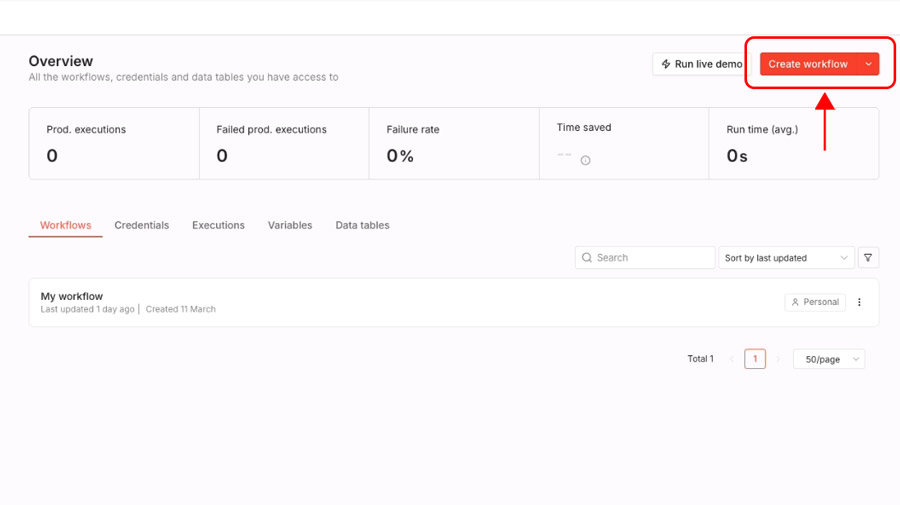
Open n8n and click Create workflow to create a new workflow.

2.

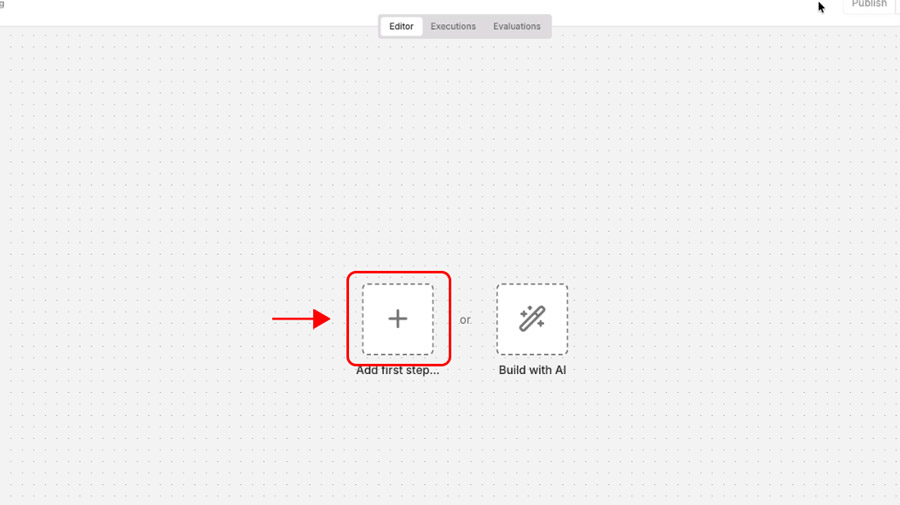
Click Add first step to add the first node, the one that will receive data from Emailchef.

3.

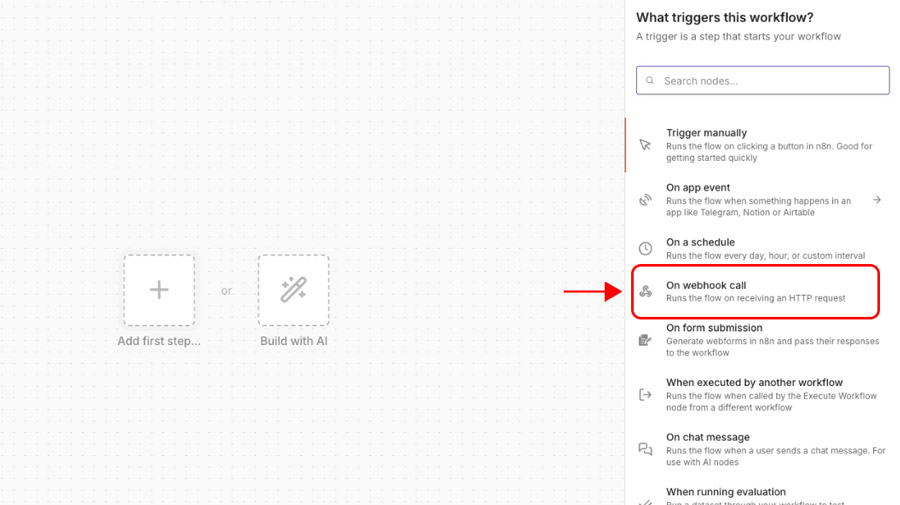
In the side panel that opens, search for and select On webhook call.

4.

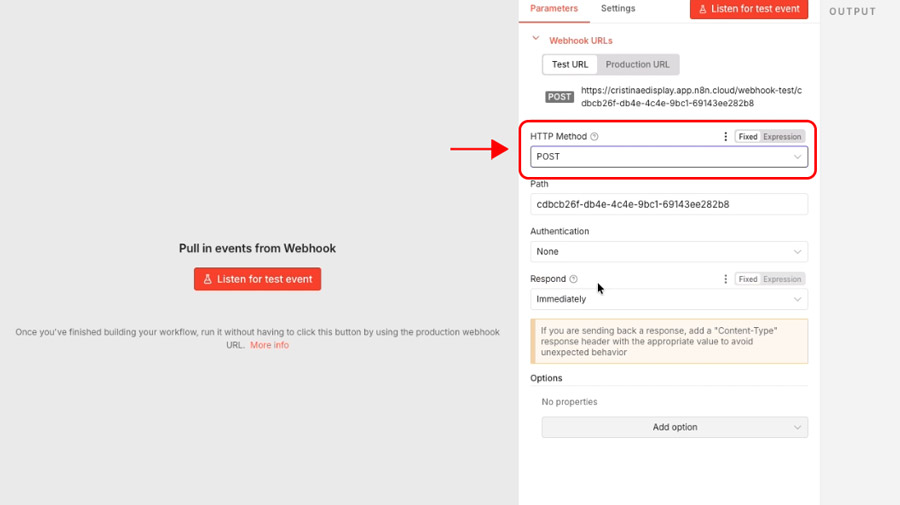
In the node settings, set the HTTP method to POST.

5.

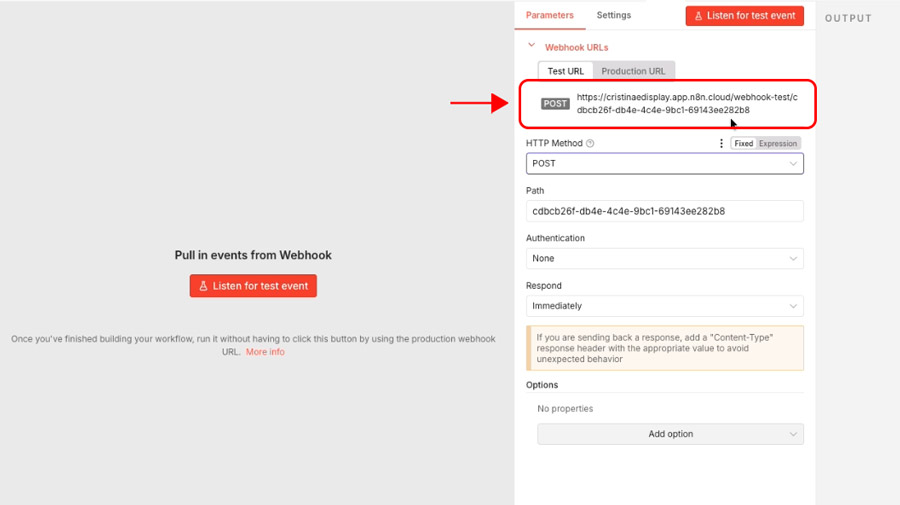
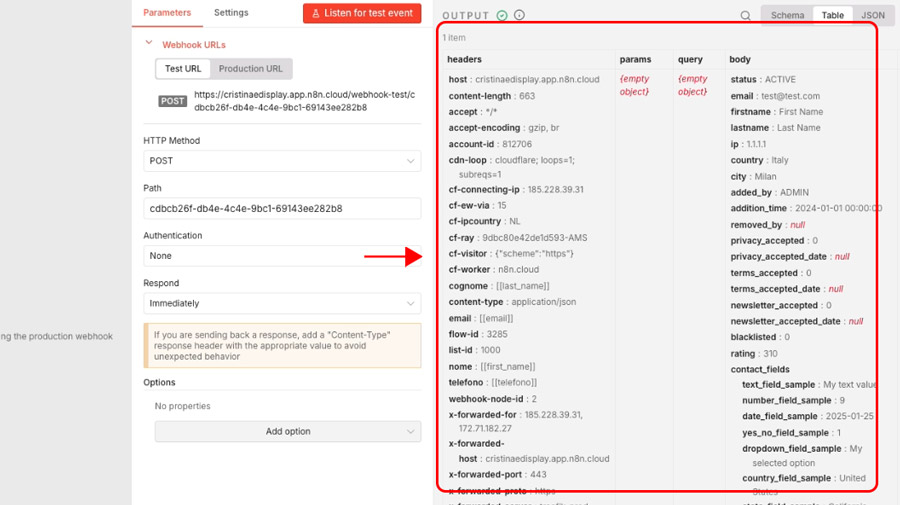
You’ll see two URLs: Test URL and Production URL. Copy the Test URL: you’ll need it shortly

6.

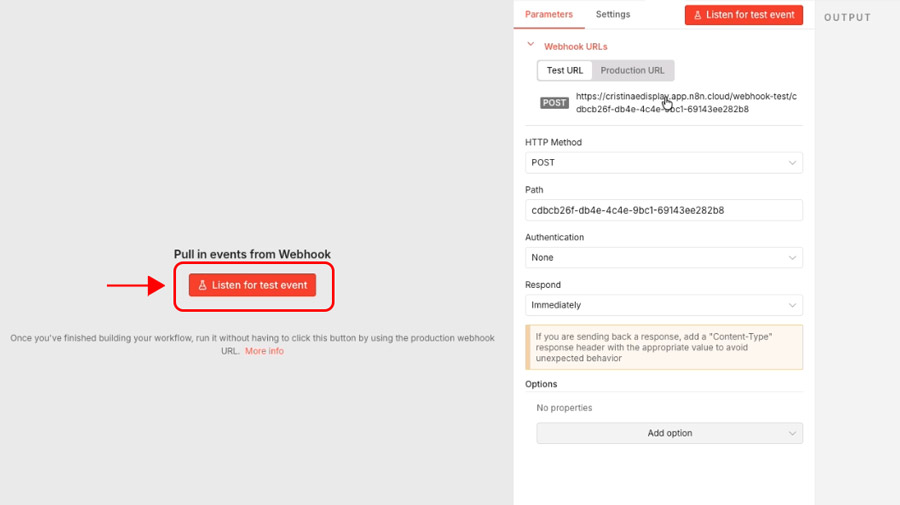
Click Listen for test event. From this point, n8n is listening and waiting to receive data from the next step.

Step 2 — In Emailchef: configure the flow and connect the webhook.

1.

Open Emailchef, click on Lists and Segments and select your contact list.

If you want your team to also receive the contact’s phone number (so they can call them directly), you’ll first need to add it as a custom field to the list. This way Emailchef will be able to send it to n8n along with name, surname and email.

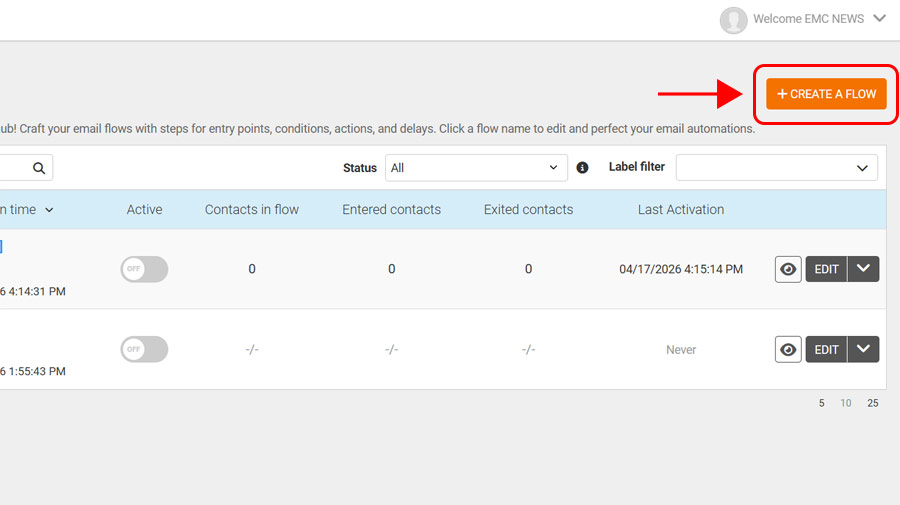
From the left sidebar, go to Automations and click Create a flow.

2.

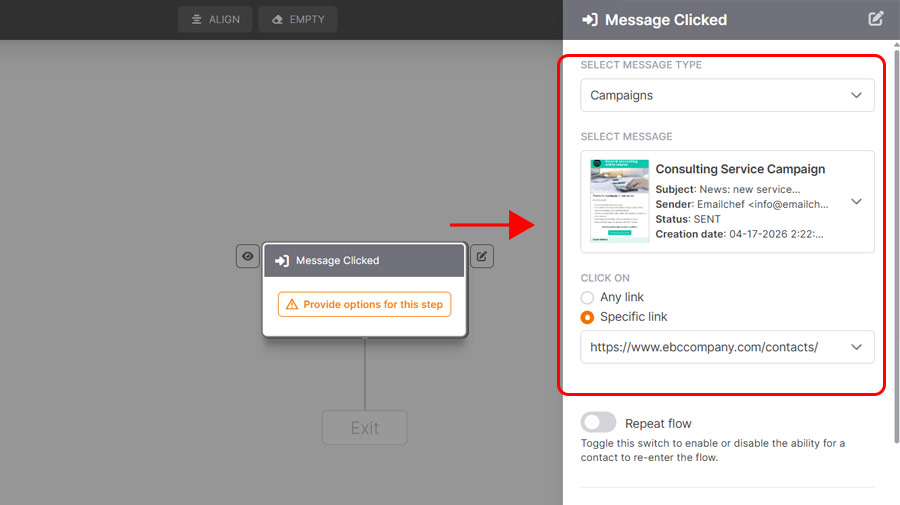
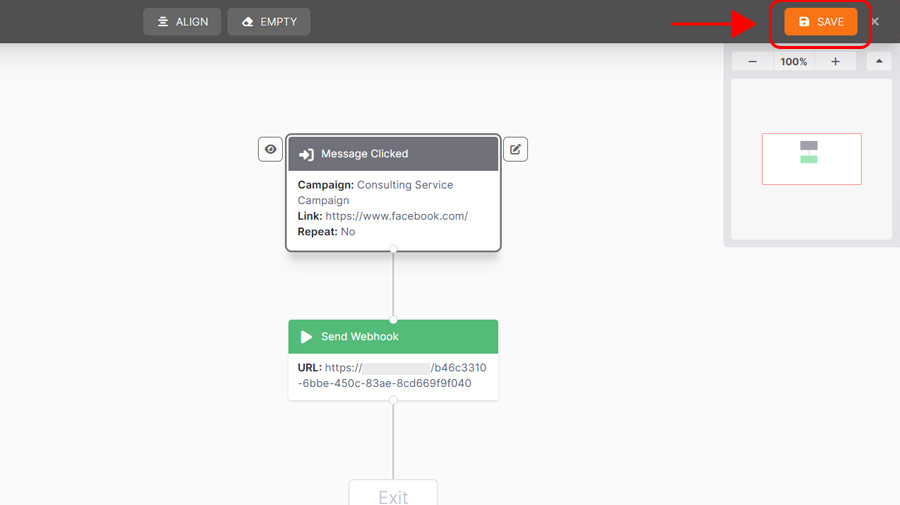
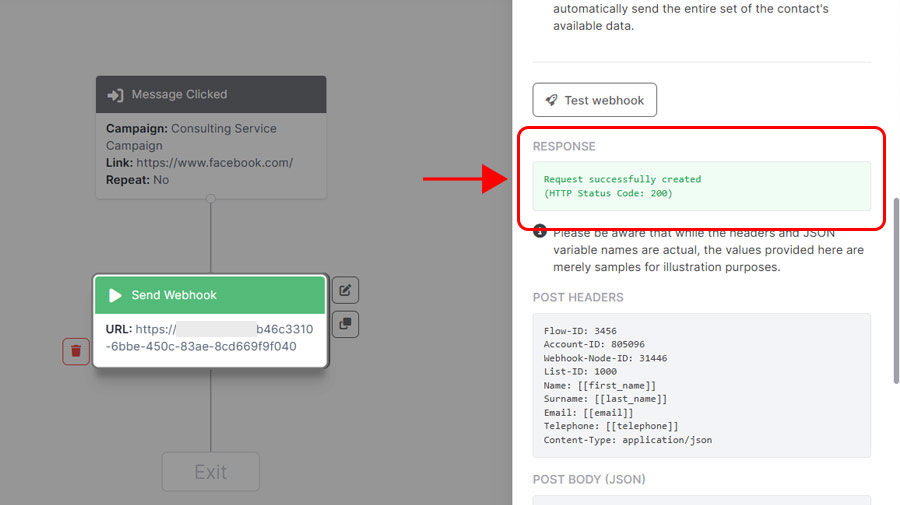
As the entry point, select Message clicked. In the right panel, choose the email campaign you created, then select Specific link and find the button link in your email. Click Save.

3.

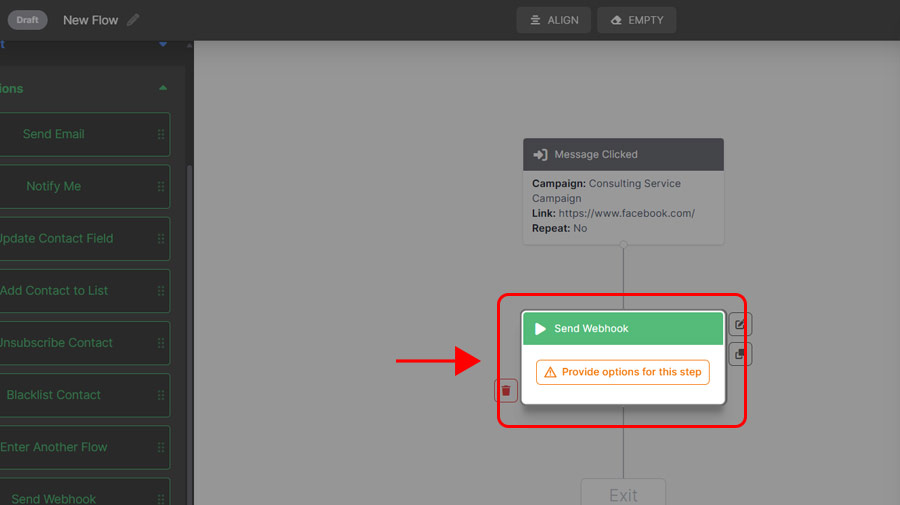
Now add the first action: drag the Send webhook node below the entry point.

4.

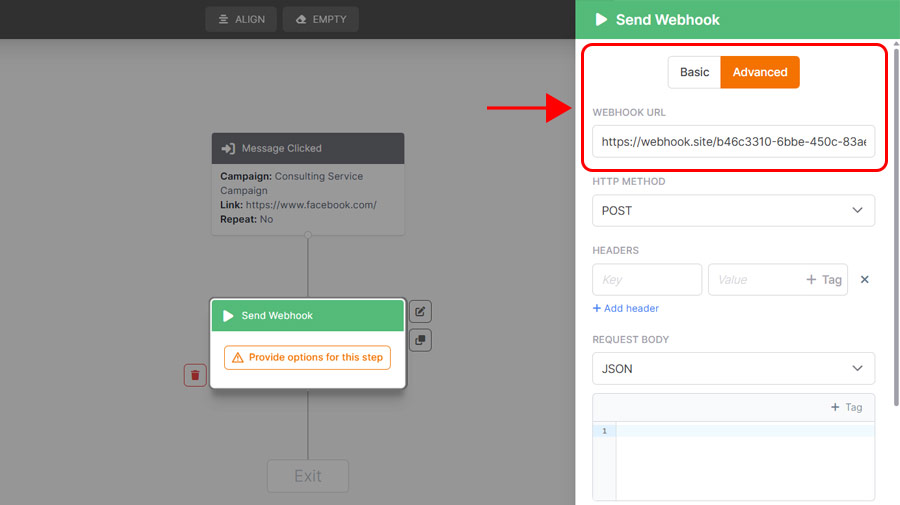
In the right panel click Advanced and paste the webhook URL you copied from n8n into the Webhook URL field.

5.

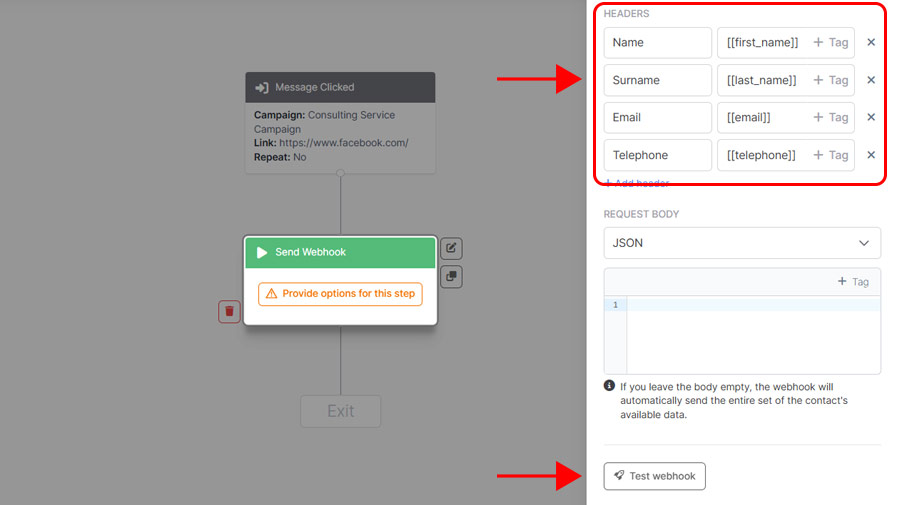
Still in the panel, add the fields you want to transmit to n8n: in this example, select First Name, Last Name, Email and Phone.

When done, click Test webhook.

6.

If the test is successful you’ll see a confirmation message. If you don’t receive a response, go back to n8n, click Listen for test event again and repeat the test from Emailchef.

7.

Click Save to save the flow.

8.

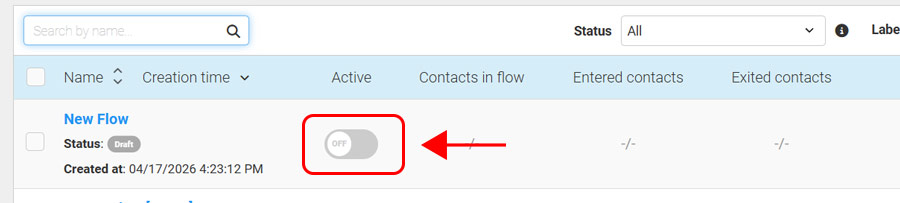
Activate the flow by switching the toggle to ON.

Step 3 — In n8n: connect the CRM and notify the team.

1.

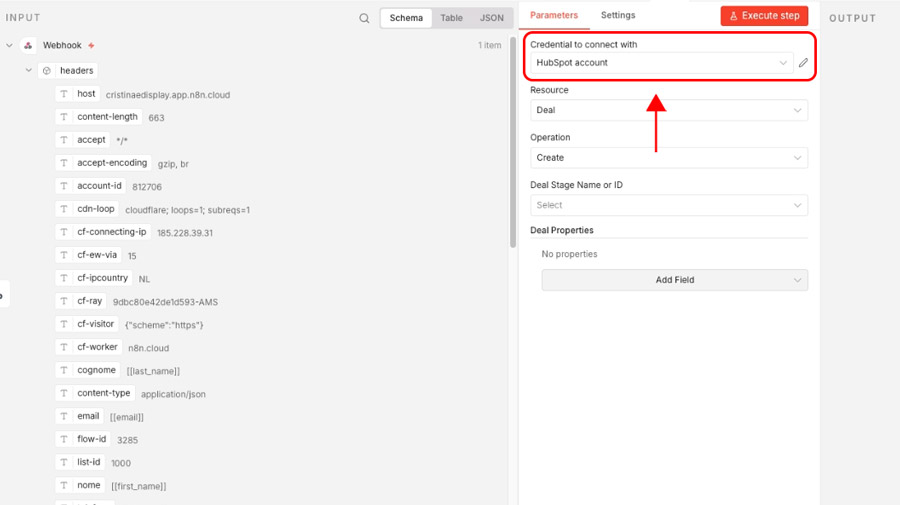
Go back to n8n. In the right panel you’ll already see the test data received from Emailchef: the contact’s first name, last name, email and phone.

2.

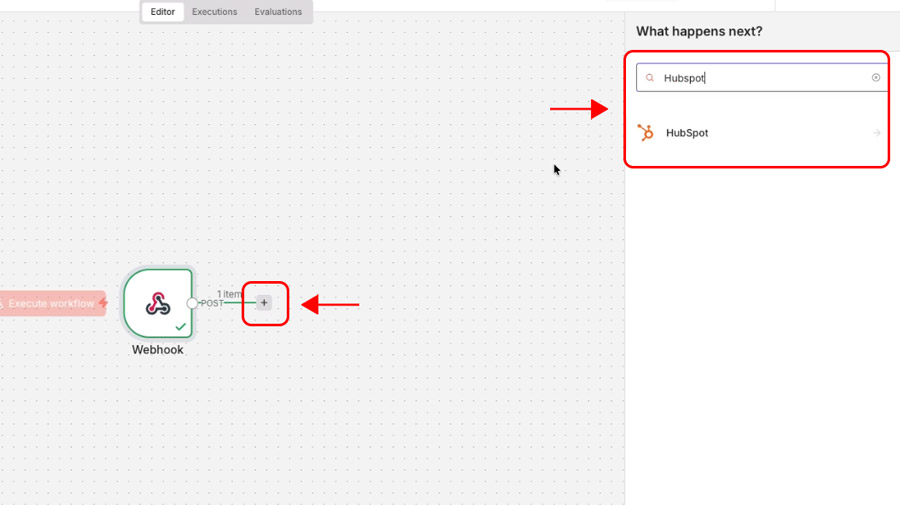
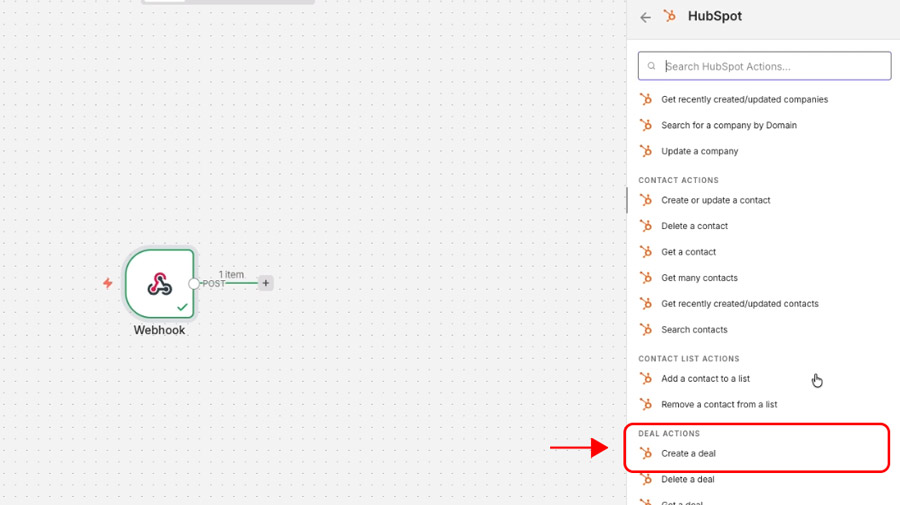
Click + to add a new node and search for your CRM, for example HubSpot.

3.

As the action, select Create a deal to automatically open a new deal.

4.

Connect your HubSpot account by following the authentication flow.

5.

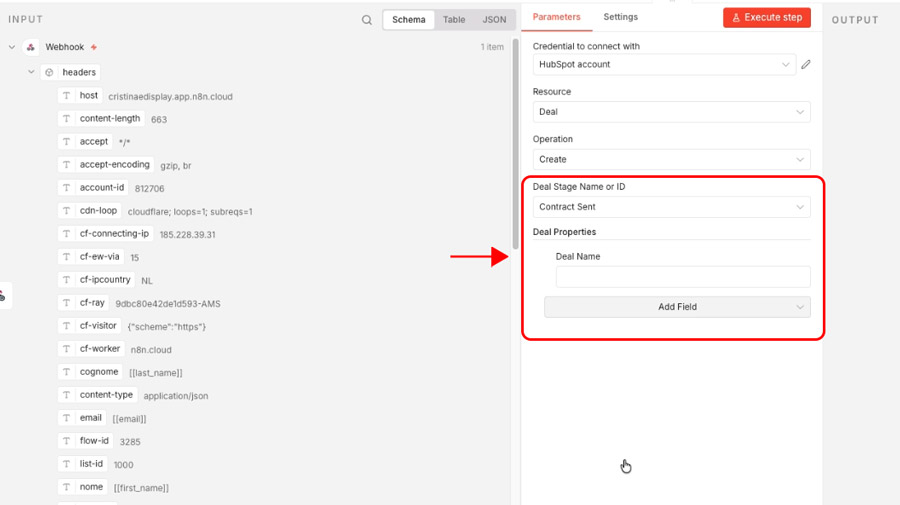
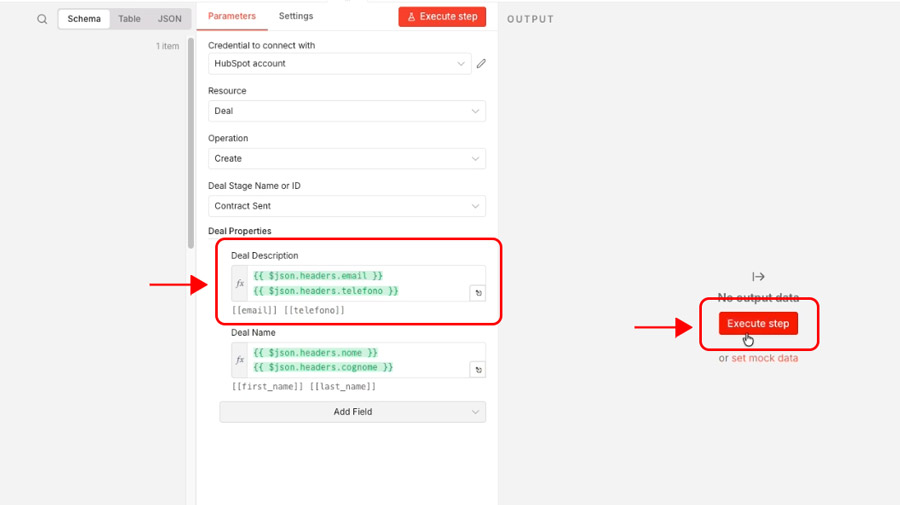
In the Deal stage name or ID field, choose the pipeline stage where you want to insert the deal, for example Contract Sent. Then click Add field and select Deal Name.

6.

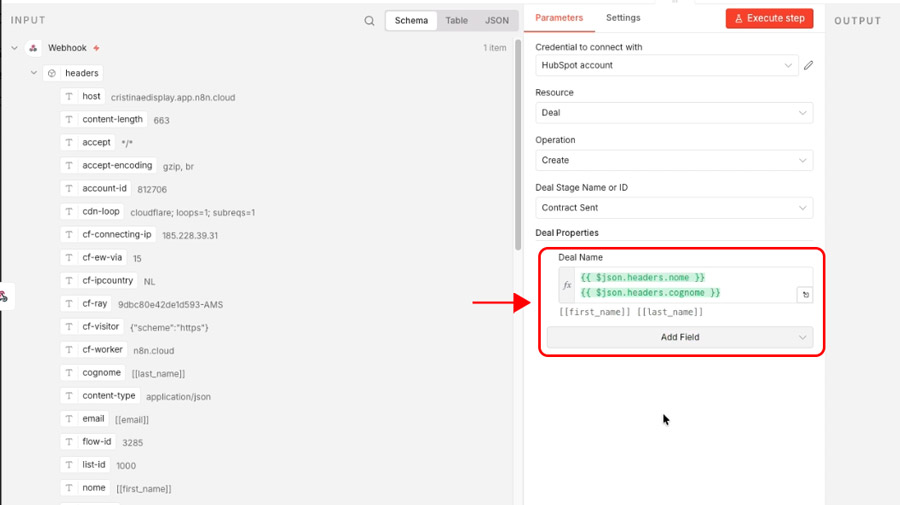
Drag the First Name and Last Name fields from the left-hand list into the Deal Name field.

7.

Click Add field again, select Deal description and drag the Email and Phone fields here. When done, click Execute step: the data is sent directly to your CRM.

Connect Emailchef to your apps with n8n

With n8n you can connect Emailchef to hundreds of tools: CRMs, spreadsheets, management tools and much more. Data syncs in real time and everything works automatically, without you having to do anything manually.

n8n integration: frequently asked questions

n8n is an open-source automation platform that connects the apps and tools you use every day (CRMs, spreadsheets, email platforms, management tools) and makes them communicate automatically. It works with a visual drag-and-drop interface: you drag blocks onto the screen, connect them together, and define what should happen at each step. Without writing code. It’s one of the most powerful open-source tools for email marketing automation available today.

The open-source version of n8n is free if you install it on your own server. In that case you only pay for the server cost, which can be very affordable. There is also a cloud version managed directly by n8n, with paid plans. You can find full pricing details on the official n8n website.

No. You can use n8n directly in the browser via the cloud version, without installing anything. If you prefer to have full control over your data, you can install it on your own server, but that’s not a requirement to get started.

Both connect different apps and automate processes, but with different approaches. Zapier is more straightforward to use for those starting from scratch. n8n is more flexible, allows building more complex logic and, in the self-hosted version, has no execution limits and no costs that grow with volume. Emailchef integrates with both.

No. n8n’s interface is visual and drag-and-drop: most automations are built without writing a single line of code. Those with technical skills can go further with custom JavaScript logic, but it’s not necessary to get started.

Yes, especially in the self-hosted version. In that case your data doesn’t transit through third-party servers: it stays in your infrastructure, where you decide. For anyone operating in Europe and needing to comply with privacy regulations, this is a real advantage.

n8n has over 480 native integrations: CRMs, spreadsheets, communication tools, databases, e-commerce platforms and much more. If a tool isn’t yet natively supported, you can still connect it via the HTTP Request node, which allows connecting to any service with a web interface.

Yes. You can configure n8n to send emails automatically in response to any event: a form submitted, a new order, a CRM update. By connecting n8n to Emailchef, you can also trigger entire email sequences (welcome, follow-up, renewal) based on what happens in your other tools.

n8n is not an email marketing platform: it doesn’t create or send campaigns directly. Its role is to connect the tools you use, including your email platform, and make data flow between them automatically. Combined with Emailchef, you can use it to add contacts to lists, update segments, and trigger automations based on external events.

It depends on the platform. With Emailchef, the connection happens through the “Send Webhook” node available in the Flow automations: you copy the URL generated by n8n, paste it into Emailchef, and the connection is done. No external connectors needed.

Generally yes, thanks to the HTTP Request node that allows connecting to any service via its web interface. Some platforms also have a dedicated native node. Emailchef connects to n8n particularly directly, thanks to the “Send Webhook” function built into its Flow automations.
Yes. You can configure an n8n workflow that, every time someone fills in a form on your website or interacts with one of your tools, automatically adds the contact to the right Emailchef list and triggers the welcome sequence. All without manual intervention.

Yes. It’s one of the most common uses. Every time a new contact arrives from any source (a form, a CRM, an e-commerce store, a spreadsheet) n8n can automatically add them to the Emailchef list you’ve chosen, with all fields already filled in.

Yes. You can connect your website to n8n via webhook: when an event occurs (a purchase, a registration, a form submission) n8n receives it in real time and triggers the action you’ve configured in Emailchef, whether that’s a single email or an entire automated sequence.